Entradas

TICO Notes- First term

  Contents test 1st term:  Click here Here are the notes about OP, digital images and digital vs printed images: TICO notes

CONSOLE

Imagen
  CONSOLE allows you to access the computer through cryptic Linux commands.  HOW TO ENTER CONSOLE AND TO EXIT?  Keybord:  ctrl+alt+Fcualquiera (to enter, full screen) ctrl+alt+t (to enter, no full screen)  ctrl+alt+F7 (to exit) Screenshot from a linux computer of school.  BASIC COMMANDS:   sudo shutdown 2  : shutdown and turns of the computer after 2 minutes. sudo shutdown –r 2  : shuts down and reboots in 2 minutes.  $ sudo shutdown 2 $ sudo shutdown –r 2 The mv command moves a file or renames it. Here the file name gets changed from first.txt to second.txt. $ mv first.txt second.txt The  exit   command exits the current shell. When you hit enter, you’ll be taken out of the terminal. $ exit

MS-DOS

Imagen
MS-DOS , in full Microsoft Disk Operating System .  MS-DOS allows the user to navigate, open, and otherwise manipulate files on their computer from a command line .  HOW TO ACCESS MS-DOS?  Click on the Windows "Start" button. Select "Programs" Select "MS-DOS Prompt"  EXIT:  exit [/b] [<exitcode>] BASIC COMMANDS: COPY Syntax of this command is “C:\>copy [desired file name and address] [destination address]” . This command is used to copy a file from a drive to another drive. RENAME Syntax of this command is “C:\>ren [old file name] [new file name]” . This command is used to rename a file. Simply out the old name of the file and new name of the file and press enter. Your file name will be renamed. DELETE Syntax of this command is “C:\>del [path and filename]” . This command is used to delete a file from a directory or a folder.

Auto Defrag - Defragmentation

Imagen
  WHAT? Defragmentation is a term used to describe the process of reorganizing a hard drive's data to help increase the proficiency of accessing the data because they are stored next to each other, and prevent file fragmentation.  Fragmentation is caused when information is deleted from a hard drive and small gaps are left behind to be filled by new data. As new data is saved to the computer, it is placed in these gaps. If the file is bigger than the gap, it will divide in several empty gaps. Consequently, they´re scattered.  WHY? By organizing the data on the hard drive, it can decrease the time it takes to run a program and open files on a hard disk drive. If it´s not defragmentated and you want to access the data, you must find all fragments of a file before it can be opened or executed. WHAT HAPPENS IF YOU DO NOT DEFRAGMENT IN WINDOWS?  File defragmentation occurs only in Windows because the rest of the systems don´t cut the files.  If you don´t defrag y...

Programing language

Imagen
  LOW LEVEL LANGUAGE Set of instructions closer to the machine code that includes the assembler and the binary system.  Examples: Machine Code and Assembly Language.  HIGH LEVEL LANGUAGE The further it is from the binary code or the complex set of instructions, the higher level it has. The high level code doesn´t run as fast as the same program written in a low-level language because it must first be interpreted or compiled into machine code. Examples: Java, Python, Prolog, Perl, etc.  Source code is the list of human-readable instructions that a programmer writes, often in a word processing program when he is developing a program. It`s a set of instructions that a computer program will follow written in high level language . Object code/compiled code   is also refered as the binary code and can be directly executed by the machine after linking. And it´s a low level language .  Compiler: Program that Translates (compiles) the source code into an ob...

Von Neumann Model

Imagen
  Von-Neumann proposed his computer architecture design in 1945 .  He wanted a model in wich the instruction data and progam data were stored in the same memory.  COMPONENTS OF THE VON-NEUMANN MODEL:  CPU: Electric circuit responsible for executing the instructions of a computer program. Inside the CPU, we can find:  The ALU ( Arithmetic and Logic Unit) performs micro-operation for executing the instruction The registers   are  high-speed storage areas in the CPU. The data processed by the CPU are ran from the registers. The Control Unit controls the operations of the ALU, the memory and the I/O devices.  BUSES: Means that conect the CPU, the memory and the peripherals.  Address Bus Carries the address of data (but not the data) between the processor and the memory. Data Bus Carries data between the processor (CPU), the memory unit and the input/output devices. Control Bus Carries signals/commands from the CPU. MEMORY UNIT: Stores binary i...

Main components of a computer

Imagen
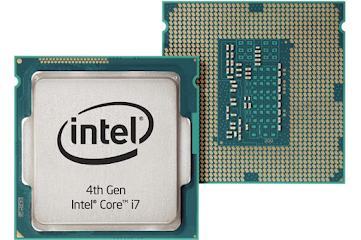
CPU It stands fo r central processing unit . The CPU is one of the most important parts of any computer, it acts like a brain. It processes and executes our commands and plays a big role in a device's speed and efficiency. When the CPU receives an instruction presented in binary form, the instruction is converted into signals that each part of the processor can work on. Finally, after the instruction is decoded, it is executed.  A core it´s a separate device inside the main CPU chip, meaning that it has the ability to do just one thing at a time . However, modern computers have the ability to support more than one core inside the main chip. The more cores a CPU has, the greater the computational power and the more tasks that can be running and completed simultaneously. The clock speed of a processor is the number of instructions it can process in a second, measured in gigahertz (GHz) . E.g:  A CPU with a clock speed of 3.0 GHz can process 3 billion instructions each second...