Von-Neumann proposed his computer architecture design in 1945 . He wanted a model in wich the instruction data and progam data were stored in the same memory. COMPONENTS OF THE VON-NEUMANN MODEL: CPU: Electric circuit responsible for executing the instructions of a computer program. Inside the CPU, we can find: The ALU ( Arithmetic and Logic Unit) performs micro-operation for executing the instruction The registers are high-speed storage areas in the CPU. The data processed by the CPU are ran from the registers. The Control Unit controls the operations of the ALU, the memory and the I/O devices. BUSES: Means that conect the CPU, the memory and the peripherals. Address Bus Carries the address of data (but not the data) between the processor and the memory. Data Bus Carries data between the processor (CPU), the memory unit and the input/output devices. Control Bus Carries signals/commands from the CPU. MEMORY UNIT: Stores binary i...
MS-DOS , in full Microsoft Disk Operating System . MS-DOS allows the user to navigate, open, and otherwise manipulate files on their computer from a command line . HOW TO ACCESS MS-DOS? Click on the Windows "Start" button. Select "Programs" Select "MS-DOS Prompt" EXIT: exit [/b] [<exitcode>] BASIC COMMANDS: COPY Syntax of this command is “C:\>copy [desired file name and address] [destination address]” . This command is used to copy a file from a drive to another drive. RENAME Syntax of this command is “C:\>ren [old file name] [new file name]” . This command is used to rename a file. Simply out the old name of the file and new name of the file and press enter. Your file name will be renamed. DELETE Syntax of this command is “C:\>del [path and filename]” . This command is used to delete a file from a directory or a folder.
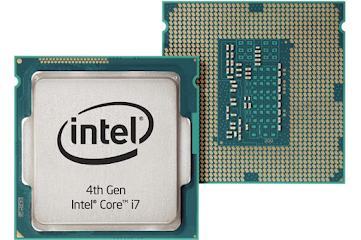
CPU It stands fo r central processing unit . The CPU is one of the most important parts of any computer, it acts like a brain. It processes and executes our commands and plays a big role in a device's speed and efficiency. When the CPU receives an instruction presented in binary form, the instruction is converted into signals that each part of the processor can work on. Finally, after the instruction is decoded, it is executed. A core it´s a separate device inside the main CPU chip, meaning that it has the ability to do just one thing at a time . However, modern computers have the ability to support more than one core inside the main chip. The more cores a CPU has, the greater the computational power and the more tasks that can be running and completed simultaneously. The clock speed of a processor is the number of instructions it can process in a second, measured in gigahertz (GHz) . E.g: A CPU with a clock speed of 3.0 GHz can process 3 billion instructions each second...


Comentarios
Publicar un comentario